
Reduce your LCD or Plasma TVs Energy Use
Posted by Norman F

Leading TVs Hacked Energy Star Test
In September 2016, the National Resources Defense Council (NRDC) found that there are flaws in the government’s method for testing the energy use of televisions. 3 major TV manufacturers representing 50% of the U.S. market appear to be exploiting them, which could cost owners of recently purchased models an extra $1.2 billion on their utility bills or $10-$20 a year for each consumer.
The study included:
- Samsung
- LG
- Vizio
- 55 inch or larger models
- 2015 and 2016 model year
3 major findings:
- Almost all Samsung and LG TVs have a motion-detection dimming feature, which dims or briefly turns off the screen’s backlight when the content on display has rapid motion and frequent scene changes like in the Department of Energy test clip and some commercials and music videos. Real world energy usage would be higher.
- Samsung, LG, and Vizio also have designed their TVs to disable energy-saving features whenever users change the main picture setting, doing so with no or little adequate on-screen warning, which can boost energy use by 50 to 100 percent, or more.
- The latest version of 4K ultra high-definition (UHD) TVs used approximately 30 to 50 percent more energy when playing content produced with High Dynamic Range (HDR) than conventional UHD content. In addition, the TV’s energy-saving features were automatically disabled whenever HDR content was played.
HDTV Energy Usage
TVs use a lot of energy, they are the #3 energy user in homes. There are several ways to reduce your TV’s energy use and many things to look for when buying a new flat panel TV. My old TV used 350 watts when running full bore, while my new set uses a fraction of that.
You can easily optimize the picture settings of your TV and reduce your energy bill and save money. Most TVs are set so they are optimized with high brightness and contrast levels to ‘look good’ or deliver wows in a TV store. The brightness and colors are cranked way up or set to what is known as “Torch Mode”. You can set your TV to optimal image settings and save money in the process.
Always set your TV for Home use, not for Store use. Set your TVs mode to one called Standard, Cinema, or Movie. Avoid modes named Dynamic or Vivid. Turn the brightness and contrast down to an acceptable level.
Our Sony XBR LCD TV has a Power Saving setting you can set to OFF, Low, High, and Picture OFF. We set this to High. It also has a PC Power Management setting to have the TV save energy when there is no signal. Newer Sharp LCD TVs when first turned on, ask whether they will be used in retail stores.
Amazon has a section with low power consumption TVs.
Power Consumption of HDTVs
CNET has a good description of how they test power usage. After they calibrate the set to optimal setting, it almost always uses less power. A top rated Pioneer Plasma TV used 40 less watts of power when calibrated. This translates to $13 or more a year power savings. Use a Killawatt to measure before and after power use. People have save $30 to $60 a year with picture adjustments.
If you are buying a new HDTV, be sure to look for a green LCD TV that consumes less power. Energy Star 5.0 standards went into effect in 2012 and requires less than 1 watt of power usage when the TV is off and has a formula for maximum energy use based on screen size. The latest specification lowered the amount of power an Energy Star HDTV could consume from the previous 4.0 standard. Look for the latest Energy Star logo on any TV you purchase.
- 50″ and 60″ TVs can only consume 108 Watts (Energy Star 3.0 allowed 318Wand 391W!)
- 42″ TVs are limited to 81 Watts
- 32″ TVs are limited to 55 Watts
LED Backlit HDTVs
Newer LCD HDTVs utilize lower power consumption LEDs to light their display instead of older fluorescent based TVs. We recommend consumers to shop for this type of LCD for the maximum savings to your energy bill. The best LED backlit HDTVs have local dimming technology.
Make sure the mounting apparatus on your LCD or plasma TV is secure. Make sure other furniture such as book cases are moved away from the flat screen TV so children cannot climb and reach the TV.
Use a smart power strip so the TV cannot draw phantom power or vampire power while it is off.
Eco Friendly OmniMount Omnilite Mounts
Looking for a mount for that new flat panel TV set? OmniMount has a new Omnilite series of flat panel mount. Both the product and the packaging are made from recycled materials. It has condensed packaging and streamlined hardware kits. Manuals and installation templates for each product will be printed on the inside of the box, eliminating paper.
Energy Star Controversy
ConsumerReports.org 2008 had an article that raises issues with the Energy Star Rating system. The EPA responded to their article, then ConsumerReports.org posted a response.
Our take is that it is great that more products become Energy Star Certified. It shows that industry cares and is moving in the right direction. As with any standard, it needs to be updated regularly to address changing conditions, something the EPA is slow to do.
The program is being improved so manufacturers will no longer be able to certify their own products. Energy use testing will be done by a 3rd party certified lab.
So many products qualify for Energy Star rating that they may want to make the criteria more stringent. Test procedures should be updated to stay with the times.
California Flat Screen TV Power Guidelines
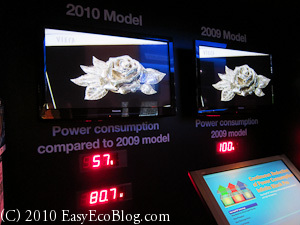
The California Energy Commission has passed new rules for TV sets. In 2013, it would save 6515 gigawatts of power a year, reduce greehouse gas emissions by 3.1 million metric tons annually, and save you $18 to $30 a year. This would affect the entire nation as electronics companies will not want to make special sets just for California.
This would affect sets 58inches or smaller and would mandate that televisions sold in California would consume 33% less energy by 2011 and 49% less energy by 2013. For example, a 42 inch screen would consume 183 watts by 2011 and 115 watts by 2013, and a 36 inch screen would consume 148 watts by 2011 and 95 watts by 2013.
More than 1,000 models already meet the 2011 standard so buy a set on this list.
Upgrading your Cable Set Top Box
When was the last time you upgraded the box you received from your local cable company? Newer boxes need to meet the more stringent Energy Star 3.0 specification, resulting in a 40% energy savings. Contact your local cable company and get upgraded.
Do you have any tips on how to save energy?
Filed under: Conservation, Easy, Effort, Electronics, Energy, Green, Reduce | Tags: 4K, Cable set top box, Energy star, LCD, Plasma, TV
If you enjoyed this post, be sure to subscribe to our RSS feed.
6 Responses to “Reduce your LCD or Plasma TVs Energy Use”
Leave a Reply
Please do not put your URL in the comment text and please use your PERSONAL name or initials and not your business name.



February 25th, 2009 at 2:16 am
[…] covered how to save energy with your flat screen TV by adjusting its picture settings and by using a power strip to turn it […]
May 5th, 2010 at 10:37 am
[…] CEC is proposing new power rules for TVs. When purchasing, try to buy a green LCD TV. You can optimize your TV set’s power use by making sure all energy saving options are on and that the picture is not set to the energy […]
August 13th, 2010 at 10:02 am
[…] Cnet has good reviews of flatscreen TVs that include power consumption. Newer LCD TVs will meet California’s low power guidelines. Optimize your TV with our LCD Flat Panel Power Saving Tips. […]
October 25th, 2010 at 9:03 am
[…] Sony LCD HDTV was Energy Star Certified and supposed to draw 0.3 watts on standby, but really consumed far more. […]
March 26th, 2011 at 9:38 pm
which brand any plasma or ldc,led,3d etc so i have diffucult which better for us budget for power also i brought climate smart kit so need help or advice to me pleae
February 4th, 2014 at 1:42 pm
[…] reduce the amount of energy being used, lower your TV’s […]